Client–property matching
How to match clients with properties automatically
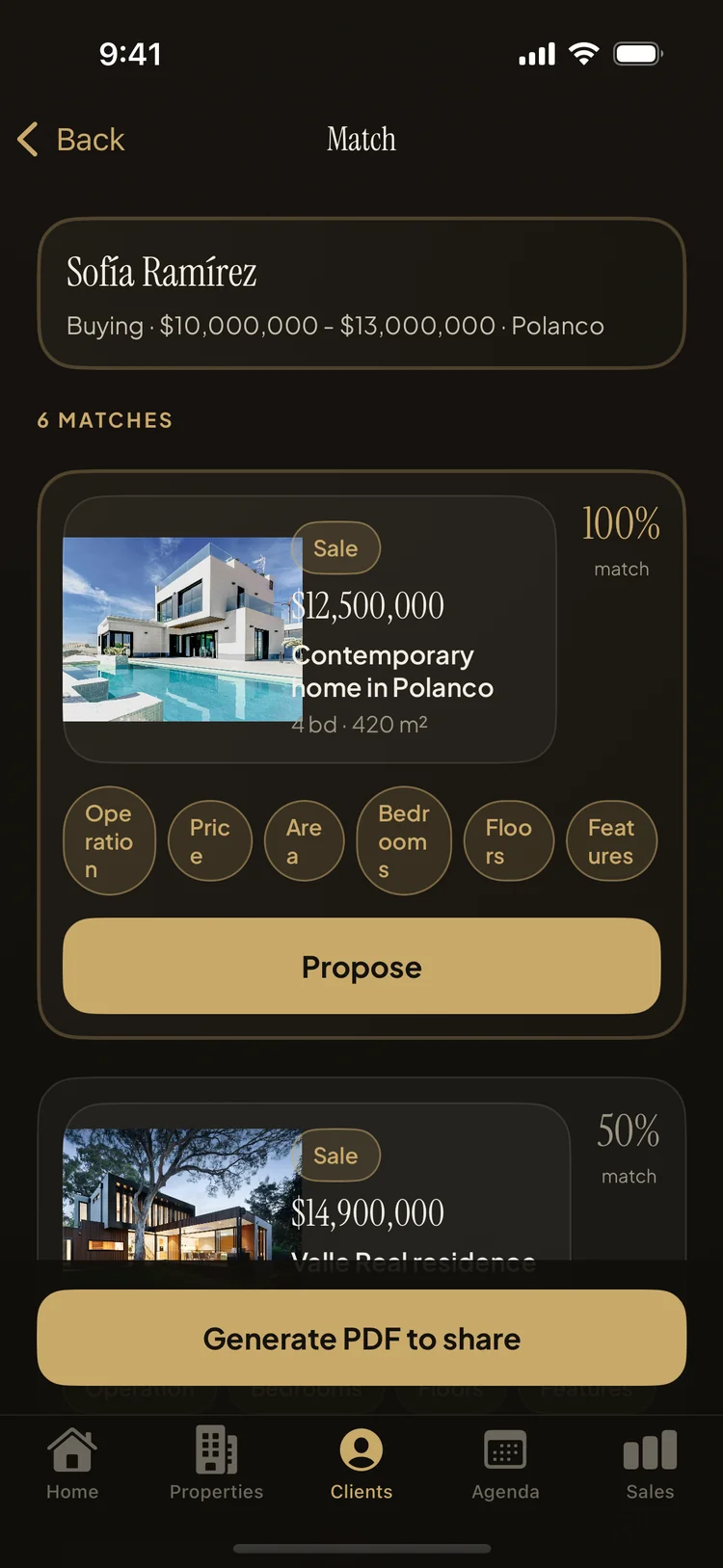
The short answer: stop cross-referencing your inventory in your head. Property Agenda scores every non-sold listing against each client's brief — operation, price, area, bedrooms, floors and features — and shows a match percentage with reason chips, so you walk into every meeting already knowing what to pitch.
Matching is the actual job. A buyer says "three bedrooms in the north, financed, up to so much a month," and you scroll your memory for what fits. That works with eight listings and three clients. At thirty listings and twenty clients, fits start slipping through: the client you didn't think of when a new house came in, the listing you forgot had a terrace, the renter who quietly became a buyer. A real estate matching app does the cross-referencing every time, for every client, without forgetting anyone.
How the scoring works
Property Agenda scores every listing that isn't sold against each client, out of 100 points:
- Price within budget — 30 points. The heaviest weight, because a home outside the budget isn't an option, it's a fantasy.
- Operation — 20 points. For sale versus for rent has to agree with buying versus renting.
- Area — 20 points. The listing's zone against the client's desired area.
- Bedrooms — 15 points. Matched against what the client asked for.
- Floors — 10 points. Single-storey requirements matter more often than you'd think.
- Features — 5 points. Wish-list tags like pool, garden, terrace or 24-hour security.
The result is a match percentage plus reason chips — Operation, Price, Area, Bedrooms, Floors, Features — that show exactly where the points came from. An 85% with Price and Area lit is a different pitch from an 85% carried by Bedrooms and Features, and the chips let you see that at a glance.
Matching in Property Agenda, step by step
- Fill in the client's brief. Budget range, buying or renting, desired area, bedrooms, floors and features — the scoring is only as good as the brief.
- Tap "View matching properties" on the client. Every listing in your inventory is scored and ranked instantly, on the phone, even offline.
- Read the chips, not just the number. Lead the conversation with the criteria that matched, and know in advance which objection is coming from the one that didn't.
- Tap "Propose." It pre-fills a showing event with the client and property already linked — pick a time and it's on your agenda with a reminder.
- Generate the PDF right from the match. Send the client a listing sheet PDF while the conversation is still warm.
Walk into meetings knowing what to pitch
The quiet advantage of scored matching is preparation speed. Two minutes before a meeting, open the client, glance at the ranked list, and you know your opening property, your backup, and the trade-off you'll have to sell ("it's one bedroom short, but it's inside budget and in the exact area"). No binder, no spreadsheet filters, no "let me get back to you."
It also changes how you take on new listings. Before committing a weekend to a property, save it and see who scores. A listing that matches three active buyers above 80% is worth fighting for; one that matches nobody in your book is telling you the price or the zone is the problem before the first open house. Matching works in both directions — clients to properties, and new properties to the buyers you already have.
What's free and what's Pro
On the free plan, every client shows their single best match — enough to feel how the scoring thinks. Property Agenda Pro unlocks the full ranked list for every client, along with unlimited properties, clients and PDF exports.
Know your best pitch before you dial
Property Agenda is free on the App Store. No account, no login, works offline.
Download Property Agenda